

The unwrap process usually must be at the end in the modelling workflow. But, sometimes we need some minor adjustments which currently will result in texture deformation.
This new option (if approved) will allow us to define when some commands will be allowed to make these adjustments on the UV information for that mesh.
In order to allow us to control that, it was added an option which shows up at the right side of the information line. Now we can turn it On/Off during the command (for the interactive ones).
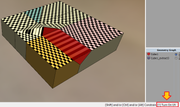
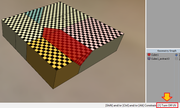
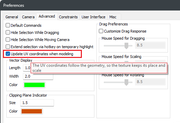
I also made it available in the Preferences->Advanced, which will be used by those commands that are applied on call.
Just observe that the switch command will act over the preferences too:
These are the affected commands: Slide, Inset Faces, Inset Region and Offset Region, Sweep, Sweep Region, Sweep Extract, Bevel (All modes), Crease, Bump, Extrude (All modes), Extrude Region, Intrude, Shell Extrude, Lift (All), Shift, Collapse, Weld, Bridge and Greebles.
It will automatically add new UV islands, which may overlap existing ones. Therefore, they will need to be adjusted in the AutoUV window (moving, stitching, and/or re-mapping).
These are 'additive' commands, as they add new faces to the geometry. However, the operation will only affect faces for which UV information has already been defined
I really liked the idea to get the Greebles already unwrapped!
Simple documentation: UV Follow - User Guide
This new option (if approved) will allow us to define when some commands will be allowed to make these adjustments on the UV information for that mesh.
In order to allow us to control that, it was added an option which shows up at the right side of the information line. Now we can turn it On/Off during the command (for the interactive ones).
I also made it available in the Preferences->Advanced, which will be used by those commands that are applied on call.
Just observe that the switch command will act over the preferences too:
These are the affected commands: Slide, Inset Faces, Inset Region and Offset Region, Sweep, Sweep Region, Sweep Extract, Bevel (All modes), Crease, Bump, Extrude (All modes), Extrude Region, Intrude, Shell Extrude, Lift (All), Shift, Collapse, Weld, Bridge and Greebles.
It will automatically add new UV islands, which may overlap existing ones. Therefore, they will need to be adjusted in the AutoUV window (moving, stitching, and/or re-mapping).
These are 'additive' commands, as they add new faces to the geometry. However, the operation will only affect faces for which UV information has already been defined
I really liked the idea to get the Greebles already unwrapped!
Simple documentation: UV Follow - User Guide
 @MicheusVieira
 @MicheusVieira
 Micheuss
 micheus4wings3d